
Fitting moteus motor saturation models
Way back in 2020, I wrote about the motor saturation model that moteus uses to accurately calculate torque when a motor is operating in a region where the stator becomes saturated. What I didn’t write about was a method for actually determining those fit parameters for a given motor. This isn’t too critical, as most position mode applications don’t require the applied torque to be terribly accurate, but in some cases it does matter. When that is the case, there is now a tool that can calculate parameters appropriate for entering into moteus. Read on to find out more!
Necessary measurements
To start, in order to actually calculate a magnetic saturation model, you will need to be able to both:
- apply a known magnitude of Q axis current for a short duration
- measure the actual torque that develops
To apply a known current, the d dq 0 X command can be used in tview
or await c.set_current() with the python API. In order to minimize
the effects of heating, I collect data on the dynamometer fixture,
with each application of current limited to a few hundred
milliseconds. However, when you don’t have a dynamometer available,
longer periods, even those measured in human time scales are possible,
the accuracy will just be reduced.
Similarly, the torque data I have collected uses a torque transducer connected to a load cell amplifier and digitizer. However, you can also use a lever arm pushing down on a scale for a lower-tech (and lower accuracy) version if you just want coarse numbers.
The collected data needs to reach a high enough current that the motor is well into the saturation region and also have sufficient resolution. Ideally the maximum applied current will exceed the current you ever want to use in the final application. As for sample spacing, a rule of thumb is that you probably want at least 40 samples evenly spaced from 0 current to the maximum current you want to support, although more is better.
Finally, this tool expects the data to be in the form of a CSV file with a single header row. The header row needs to label which column is the current and which column is torque, but otherwise it could have additional data fields as necessary.
The fitting tool
The fitting tool is present in the moteus github repository:
It only has a few arguments:
- --current-header: The header for the column containing current data.
- --torque-header: The header for the column containing torque data.
- --title: An optional title for the resulting plot.
The defaults for the column headers match an internal format used within mjbots. You can either make your CSV have those headers, or pass alternate header labels.
When you run the tool, it emits the fit to the console and generates a plot:
SaturationModel(
    torque_constant=0.062318076715898514,
    rotation_current_cutoff=20.50297798204828,
    rotation_current_scale=0.04211841324630571,
    rotation_torque_scale=1.0255238966982647)
Kv: 133.18767903956373
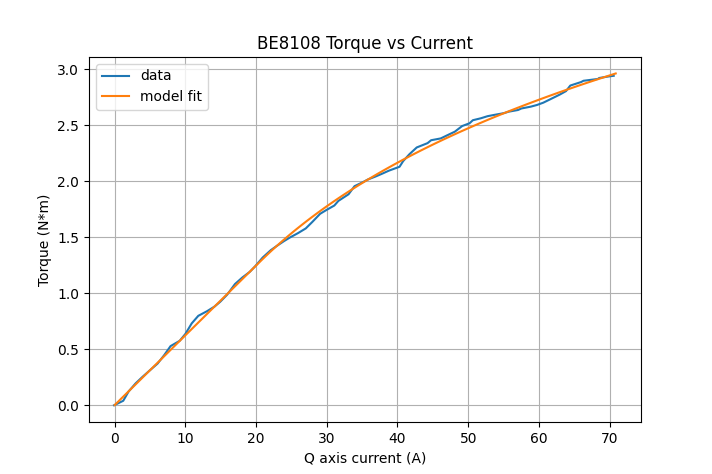
The rotation_* values in the SaturationModel output can be
directly entered into the moteus motor. configuration values. The
Kv is just for reference, as it should have already been calculated by
moteus during calibration.
This is the tool that was used to generate the saturation models for all motors that have them in the moteus performance analysis tool, and hopefully it can be of use to you as well!