Archives: Features

Native socketcan support for mjcanfd-usb-1x

Since the fdcanusb, and subsequently the mjcanfd-usb-1x, have been released, the only interface they presented to a PC host was a USB CDC (communication class device). That meant they appeared as a modem, on linux as /dev/ttyACMx and on Windows as COMx. Sending and receiving frames was pretty simple using a basic line based protocol.

This works fine as long as you are either using the mjbots tools, or designing a complete custom application. However, if you want to use the adapter with other CAN or CAN-FD based applications on Linux, there wasn’t a whole lot you could do. There was a simple daemon which, with a fair amount of effort, would make the hardware appear as a slcan device, but that was finicky and hard to get working and not terribly reliable.
PWM input support

The new features and capababilities for moteus just keep coming! Here is another relatively straightforward one available in firmware release 2026-01-21, support for PWM (pulse-width-modulated) inputs. If an appropriate pin is configured, moteus can report the period and duty cycle of a PWM input to applications. This can be used to monitor the fan RPM for the moteus cooling fans on moteus-c1, moteus-n1, or moteus-x1, or could be used to read the value of a RC receiver output. Read on to learn how to use it and what the limitations are:

BiSS-C encoder support

I’d like to announce more encoder support in moteus, this time for BiSS-C encoders in unidirectional mode. BiSS-C is a protocol often used in higher end industrial encoders that uses a RS-422 wire level signaling scheme. This support works out of the box for moteus-n1 and moteus-x1 which have a RS-422 connector already included. All you need is to have firmware 2026-01-21 or newer installed and to follow the documentation for upgrading.

If you want to see a specific configuration example, or read about how the feature was implemented, read on!

More stable acceleration limiting

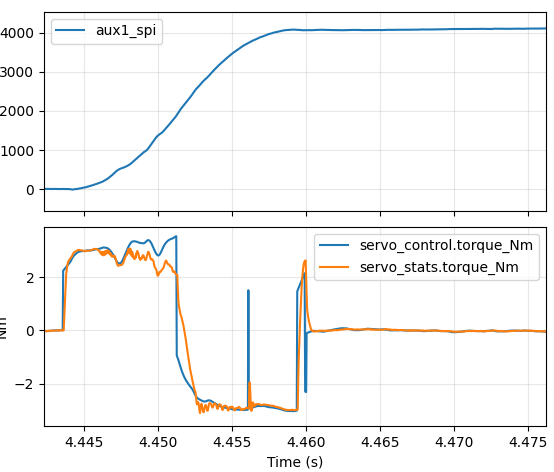
Back in 2022 moteus added support for acceleration limited trajectories. This was a highly requested feature and has been used for all sorts of applications since. However when working on the recent trajectory optimization effort it became obvious that there were still some lingering stability issues on two fronts. First, when decelerating, there would occasionally be single control cycles where an acceleration was instead commanded. Second, termination at the end of a move would often involve small amounts of overshoot or oscillation. You can see both in one of the plots from that post here:

Acceleration instability

Acceleration instability

I’ve known about this for several years now, and occasionally have spent a few minutes trying to think of alternate formulations that would be more stable. With my recent attempts to use Claude Code, I thought maybe it could help here too since at least this part of the firmware is entirely tested by host side unit tests? Well, the answer was I suppose it did help, but not exactly in the way I originally intended. Read on for more details, or upgrade to moteus firmware 2026-01-21 if you just want the fixes.

tview logging

Wow, the updates to the graphical moteus monitoring application tview just won’t stop! We’ve had a lot of changes recently (python console, fault text decoding, fault monitoring, UUID addressing) and now here is yet another long requested big quality of life improvement – recording data to log files! As of pypi moteus-gui version X, tview now can write log files in either the .jsonl format as a single file or as a set of CSV files. Continue reading for more details!

moteus hardware CAN ID filtering

Recent improvements to the mjcanfd-usb-1x and the pi3hat were stepping stones to improved reliability for long daisy chains of moteus controllers. Another step in that process is the feature I’ll describe here, hardware CAN ID filtering in the moteus firmware. Let’s talk about how things used to work, what the problems were and how this new feature helps.

moteus_tool --read

moteus_tool has long served as the primary interface to moteus controllers from the command line for provisioning and diagnostics, especially so when used in headless environments where running a graphical tool like tview is not an option. As anyone who has debugged a moteus system from the command line can attest to, finding the contents of diagnostic stream channels is annoying at best and that is only if you know how to do it. In short, you have to use --console, and then type some undocumented text incantations .

Thus a new feature in moteus_tool: the --read CHANNEL command line flag, which reads a single instance of an arbitrary diagnostic channel from the device, then prints it to the console as JSON formatted structured data. Let’s check out what that looks like:

tview python console

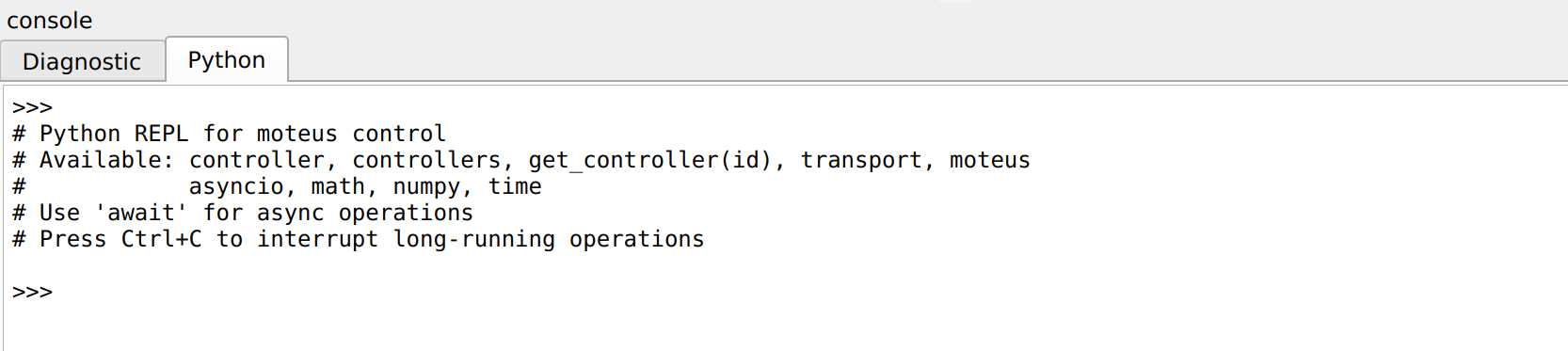
The tview graphical monitoring application has been getting a lot of work lately. First was support for enumerating controllers by UUID, then monitoring faults and graphically highlighting them and then decoding textual values for fault codes. I’m excited to announce yet another improvement for tview, this one on the larger side: an interactive python REPL (read-evaluate-print-loop)! Available now in pypi moteus-gui v0.3.93.

The bottom console now has two tabs, the first and default remains the diagnostic console, where you can see what diagnostic messages the devices are emitting and send diagnostic channel commands directly to connected devices. The new, second tab, is labeled “Python” and provides access to a fully functional Python evaluation environment with full access to the moteus python library, including asynchronous operations.

Read on to see how to use it.

Device fault text decoding

Here’s a short followup tview feature in the same vein as the recently announced fault monitoring. For various not-too-important technical reasons, the diagnostic method moteus uses to report faults in servo_stats.fault does not include a text shorthand like most other enumerations do. That means that users are constantly confronted with things like fault=33, or fault=39. Unless they are lucky and know to look in the relevant section of the reference, this doesn’t do a whole lot of good.

Device fault monitoring in tview

When using tview to monitor and control moteus controllers, there have been a fair number of limitations and “gotchas”. One of the biggest for newcomers is the distinction between error checking in the d pos command, and faults that can occur during position mode itself. When using the diagnostic protocol and issuing a command, for those commands which direct moteus to perform some control action, the controller will respond with an “OK” as long as the command itself is syntactically correct. Only then is it submitted to the online control loop, after which faults resulting from the command will manifest as the controller reporting a mode of kFault or 1, with a corresponding fault code. In the diagnostic tree view, those are shown as servo_stats.mode and servo_stats.fault.

So, what many newcomers do is take a moteus board fresh from the factory, which starts with servopos.position_min=-0.01 and servopos.position_max=0.01, and do the following in order:

  1. Issue a totally reasonable command like d pos nan 0 nan to command the motor to hold position
  2. Observe an OK come back
  3. Don’t see the motor do anything

What those users don’t realize is that in order to see why moteus doesn’t move, you need to look at the current reported mode and fault, not at the response over the diagnostic channel.

Here I’d like to describe a solution to this problem that hopefully makes tview much easier in general with fewer instances of confusion resulting.